How to Increase Your Click-Through Rate in 8 Simple Steps
22.02.2019
What does it take to increase the percentage of clicks from Google search results? This detailed article will guide you through eight steps that, once implemented, will help you attract more targeted traffic and increase sales.
Step One: A Headline That Attracts Attention
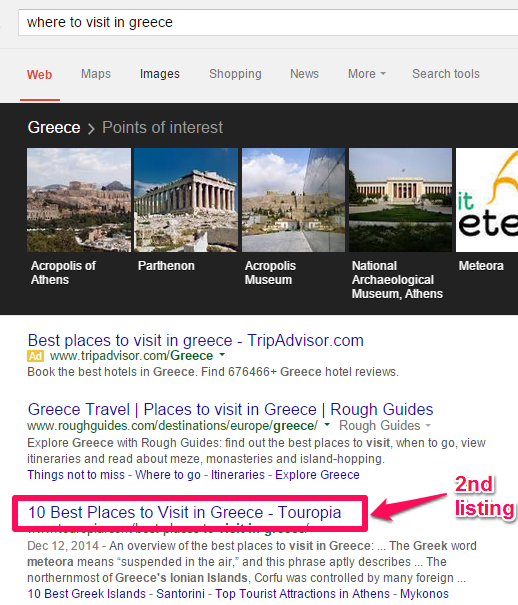
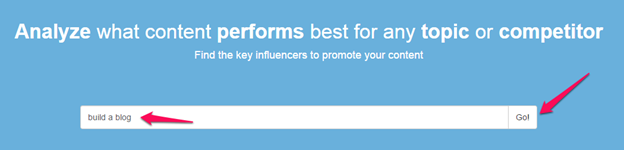
One way to stand out on search engine results pages (SERPs) is to create attention-grabbing headlines — Title tags. The fact is that, in search results, 8 out of 10 users will click on a headline if it is compelling and attractive. To see how this can help increase the number of clicks to your website, it is worth following the tips below. Always remember that improving CTR contributes to higher rankings for key queries and is one of the important aspects of proper SEO website promotion. Returning to the search results, it does not matter whether you rank first or tenth on the first page of results if your headline is attractive — users will be drawn to it. The better your headlines are, the more your click-through rate will increase, and the better your quality score will be. Here is a good example: the other day, I was looking for beautiful places to visit in Greece. At first, I clicked on the second search result because the headline was clear, relevant, and caught my attention — partly because it included a number. image So, how do you create short and intriguing headlines to increase the number of clicks and improve your quality score? In addition to conducting keyword research, analyzing viral headlines is an excellent strategy. You can learn a lot from headlines that have generated the most social engagement and traffic. So, open Buzzsumo.com. Enter your main keyword (for example, “create a blog”). Then click the “Go!” button: image Analyze the best-performing headlines and create your own models using the leaders as templates. Ask yourself the following questions:- What do these popular headlines have in common?
- What is so appealing about these headlines that they have generated so many social reactions?
- Can I write a better headline to increase my average CTR?
- 5 steps to creating a blog that honestly earns $1 million a month.
- 5 steps to create a blog and gain 9,000 subscribers.
Step Two: Strategically Optimize Your Meta Descriptions
Are your page metadata optimized to increase the likelihood of users clicking through to the page? This is an important aspect of on-page SEO because without optimizing the text snippet, your headline is unlikely to generate a high CTR. A meta description by itself may not improve your website’s ranking or quality score. However, it will definitely earn you more clicks if it is created correctly. As your pages move higher in the rankings, a good meta description will generate a higher CTR. The ideal length of a meta description is around 155 characters. It should contain a clear, well-written, and interesting description of your headline and the content itself. You can also add attention-grabbing elements. Think about it as writing something that you want users to become interested in and that will make them want to click. Here are several methods for writing excellent meta descriptions that you can try yourself:- Answer the question: the only reason users come to Google in the first place is to find an answer to their questions. If you can answer that question in the description, you have already won half the battle for getting the click.
- Make it specific and relevant: when writing your meta description, make sure it is relevant and specific to the keyword people enter in the search box.
Step Three: Use Rich Snippets
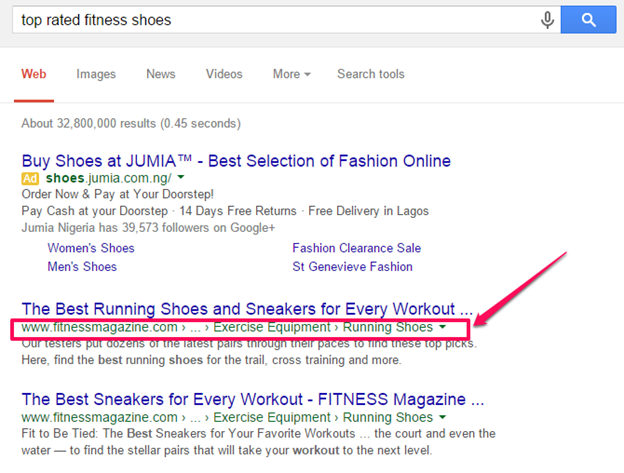
Over the past few years, search algorithms have changed significantly. However, some ranking factors remain relevant. One example is Rich Snippets. We see them in search results all the time. The benefits of Rich Snippets include:- attracting visitors to the relevant search result;
- providing more information about the page;
- telling users exactly what is on the page even before they click on it;
- increasing the amount of space occupied in the search results.
Step Four: High-Quality Visual Elements
One of the most effective tactics for optimizing content on social media is to use images and photographs. This is why so many software solutions, such as Piktochart, Powtoon, and Canva, are quickly turning average bloggers and self-publishing authors into graphic designers. You should take advantage of visual elements. For example, photographs of people can increase viewers’ loyalty. You can improve users’ positive attitude toward your pages by using photographs of people on your page. When users see human images, they will feel more comfortable and stay on the website longer, increasing the time they spend viewing your page. By using relevant images, charts, screenshots, or videos directly on a web page, you provide additional information on the topic and make the content easier to read. When search users find images that appeal to them, they will respond. If a potential customer searches for “how to do SEO” and lands on a web page (as shown in the image above), they see “SEO” in the image. This alone tells them that it is worth staying and scrolling down to see what is available for them.- Remember that Google follows people. If search users are not impressed by your landing page, Google concludes that your content is low quality and does not deserve top rankings and traffic. This will reduce your quality score and your chances of ranking highly.
- Optimize images correctly: using the right images is not enough. You also need to optimize them. Once they are properly optimized, you will start generating more search traffic.
alt tag — a short description of the image.
When you see a picture of a brand-new car, you can quickly recognize it as a Honda Civic, but search engines do not. They are essentially blind when it comes to the subject of an image.
Without alt text, Google does not know that the image on your web page is a Honda Civic. Your job is to help search engine crawlers understand your images by using alt text.
This applies to everything from blog images to advertisements and promotional banners. Alt text tells search engines what your image represents and how relevant it is to the page content.
Google has officially confirmed that it uses alt text when trying to understand what an image represents.
Here is a simple HTML code for an alt tag:
<Img src = “baby-crying.jpg” alt = “Baby Crying” />
Remember that Google dislikes over-optimization and may penalize you for trying to manipulate search engines by excessively repeating keywords in your alt text.
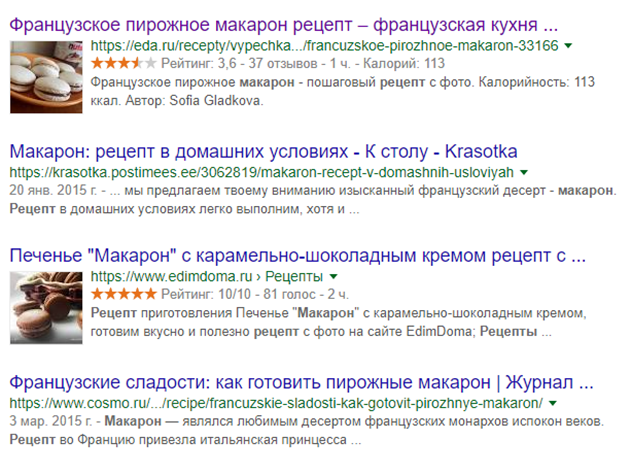
Here is what images look like in a snippet for the query “Pasta Recipes”:
image
Here, recipe structured data markup is used, in which you add a link to the photograph that will be displayed in the search results.
If you are interested in how to implement this type of optimization, contact seomarket.ua, and we will provide a completely free consultation!
Minimize visual effects to improve website speed: page speed is an important aspect of a landing page that also needs to be optimized.
Recent studies have shown that 47% of online shoppers will leave your web page if it fails to load within 3 seconds.
To reduce the number of visitors who abandon your pages, speed up your website by optimizing your images. Optimization can also improve image quality.
If your landing page contains many large images and loads slowly, use Imageoptimizer.net and follow these simple steps:
Go to the image optimizer. On the home page, upload the image file you want to minimize. Set the required size and make sure that the image quality is “normal” or “high quality”.
Then click the “Optimize Now!” button to compress the image and make it load faster on the web: