Tracking SMS Campaign Traffic Is EASY!

Tracking SMS Campaign Traffic Is EASY!
As is well known, Google Analytics is a powerful modern web analytics tool that provides virtually unlimited opportunities for collecting statistical data and subsequently analyzing it. It is quite obvious that, in the hands of a skilled professional, this analytical system is capable of answering virtually any question that may arise. However, situations sometimes occur when the standard functionality of Google Analytics cannot perform the tracking required, making additional adjustments necessary. One of these rather unconventional situations is tracking traffic generated by SMS campaigns. The unusual nature of such situations lies in the fact that Google Analytics uses UTM tags to track traffic sources. These tags provide the high level of segmentation required when analyzing the effectiveness of advertising channels. However, when tracking SMS campaign traffic, the use of UTM tags is, by definition, impossible. At the same time, projects involving SMS campaigns are becoming increasingly common in the work of many webmasters. So, how can an optimal solution be found in such a situation? Let us consider the following example. Suppose a large-scale project has been launched to promote a new mobile application. As part of this project, a website is created to provide potential users with all the necessary information about the new application, as well as several options for obtaining it. As is traditionally the case with most projects of this level, Google Analytics is installed and configured on the website to track audience behavior and record target actions. The main feature of this project is a large-scale advertising campaign targeting mobile devices. In other words, an SMS campaign is conducted using the customer database. The messages contain a call to learn more about the new mobile application on the website, along with a link to its mobile version. The main goal for the web analytics specialist is to track this advertising source as accurately as possible, with four levels of segmentation:
  • Mobile operator.
  • Subscriber's city.
  • Operating system used on the mobile device.
  • Text version of the advertisement.
If this were a traditional traffic advertising channel, the task could easily be solved using UTM tags by using a link such as: http://site.com/?utm_source=kievstar&utm_medium=sms&utm_term=text1&utm_campaign=kiev However, in order to save characters in the message, which can significantly increase the cost of an SMS, using links of this kind is impractical. If no tags were used in the message at all, all visitors acquired in this way would be classified as direct traffic, making segmentation impossible. Using a shorter custom tag would only partially solve the problem. Based solely on reports for landing pages, some segmentation of incoming traffic could be implemented, but analyzing the data would also be rather inconvenient. Therefore, none of the methods described above can fully help achieve the desired goal. As an optimal solution, a short custom tag can be used together with a script that would break this tag down into the traditional segments used in Google Analytics. For example, the tag could consist of three letters and one digit, where:
  • the first letter indicates the mobile operator sending the SMS messages;
  • the second letter indicates the city to which the messages are sent;
  • the third letter indicates the operating system of the device receiving the advertising message;
  • the digit identifies the content of the advertising message.

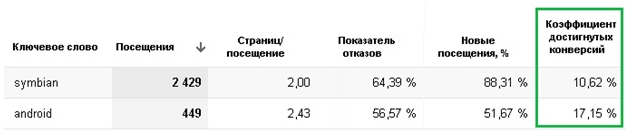
For example, the link for subscribers of the Kyivstar network who use the Android operating system on their mobile devices and live in Kyiv would look as follows: http://site.com/?sms=kka1 However, it is quite obvious that using only one such tag does not fully solve the problem, since it ultimately results in a huge number of landing pages, the structure of which makes data analysis extremely complicated. To solve this problem, a special script needs to be written and installed on the website so that it runs before the main Google Analytics code. The main task of this script is to decode the received tags and set the cookies responsible for storing information about the visitor's traffic source. Thus, if the visitors' cookies are correctly set by the script, they will, in turn, ensure that the traffic source data is correctly reflected in Google Analytics reports. In other words, the «source or channel» field in the reports will contain the full name of the mobile operator; the «campaign» field will contain the city; the «keyword» field will contain the operating system of the user's mobile device; and the «ad content» field will contain the version of the text. This reporting format is much more convenient for analysis. To determine how effectively each targeting type works and which one is better at attracting potential customers, it is necessary to analyze visitor engagement metrics and conversion rates for the main target actions. For example: report Thus, with a relatively simple approach, it is possible to quickly configure visitor behavior tracking on a website in situations where standard solutions cannot be applied. Author: Alexander Fionin  

How useful was this post?

Click on a star to rate it!

Average rating 0 / 5. Vote count: 0

No votes so far! Be the first to rate this post.

SEO продвижение